Practical performance advice for website owners
Why Is My WordPress Website Slow? Diagnose the Bottleneck Before Buying Another Plugin
Need hands-on help? Request a Speed Review →
WordPress performance advice · Reviewed 3 November 2026
In this guide
A customer says your website takes too long to open. You install a cache plugin, switch on every setting and see a better score. Then someone reports that the enquiry form no longer submits. The original problem has become harder to diagnose.
A useful WordPress speed audit starts with a smaller question: what is slow, for whom, and at which point in the visit? That answer determines whether you need a content change, configuration work, development or a hosting investigation.
Describe the symptom before changing settings
Write down the URL, device, browser and action. “The homepage is slow” is less useful than “the mobile homepage stays blank, then the headline and photo appear together.” Include whether the problem affects new visitors, logged-in users, search results or checkout.
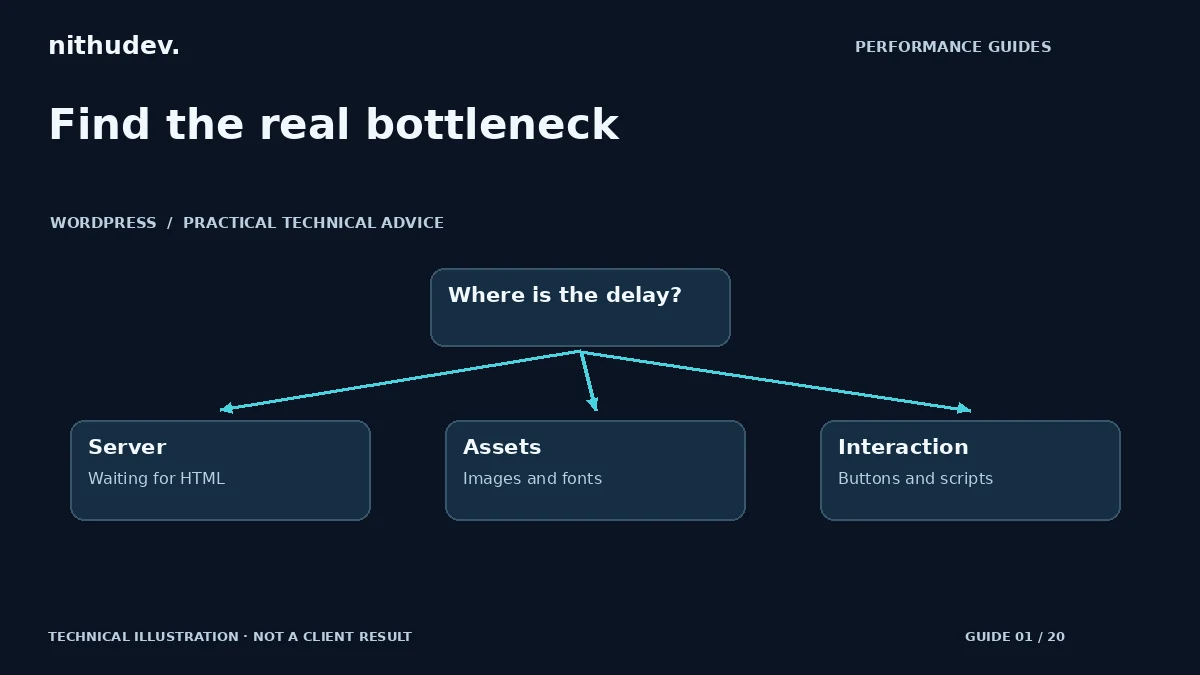
- Waiting before anything appears: investigate the document request, redirects and server response.
- Text appears but the main image arrives late: inspect image discovery, size and loading priority.
- The page looks ready but buttons hesitate: record the interaction and investigate JavaScript work.
- Only the dashboard is slow: examine administrative requests, scheduled jobs and integrations separately from public page caching.
Compare representative pages and visitor states
Test a homepage, a normal content page and a commercially important page. For a store, include a product, cart and checkout. Open a clean private session as well as your usual browser. Logged-in administrators often bypass the cache, so their experience may differ from an anonymous visitor’s.
Run several comparable tests rather than treating one Lighthouse score as a verdict. Keep the device profile and test location consistent. Save the waterfall or trace, not just a screenshot of the score. A repeated slow document request is a different lead from a single unusually busy server response.
Use the evidence to choose the next investigation
| Evidence | Next investigation |
|---|---|
| HTML request consistently waits | Cache status, hosting resources, database work and external server calls |
| Large downloads dominate | Image dimensions, video delivery, fonts and unnecessary assets |
| Long browser tasks after loading | Plugin scripts, widgets and third-party code |
| Only personalised pages struggle | Session-dependent queries, payment/shipping requests and dynamic functionality |
Make one reversible change at a time
Back up files and database, record the current configuration and use staging for changes that affect scripts or templates. Pick one bottleneck, apply a targeted change, then repeat the original test. Keep an improvement only after the relevant user journey still works.
Do not delete plugins just because they appear in a request list. A booking tool may be essential, and its script might be needed only on one page. Conditional loading or a lighter configuration may be a better answer than removing the feature. Likewise, a faster host will not automatically fix a huge hero video.
Know when the audit is useful enough to commission work
You should finish with a short list of affected templates, evidence for each likely cause, proposed fixes, risks and acceptance checks. Ask a specialist to separate quick configuration improvements from custom rewrites and third-party limitations. That makes a quote easier to compare and prevents an open-ended promise to “make everything faster.”
If the site has suddenly become slow alongside unknown users, unexpected redirects or suspicious files, investigate a possible security incident as well. Speed tuning alone is not a malware investigation.
Work directly with Nithu
Get help with your WordPress performance
Send your slow URLs and the actions that feel delayed. I can review the evidence and help you choose an appropriate optimization scope.
Request a Speed ReviewCompare the $79, $179 and $349 one-time packages →
No payment is needed for an enquiry. Scope is confirmed before work; paid tools, hosting and out-of-scope development are separate unless agreed. No fixed score or ranking guarantee.
Technical references
Written for website owners planning performance work. Technical options depend on the installed versions, hosting and integrations. Test changes safely and retain a recovery path. The featured diagram is an original editorial illustration, not a measured result or customer case study.