Why Is My WordPress Website Slow? Diagnose the Bottleneck Before Buying Another Plugin
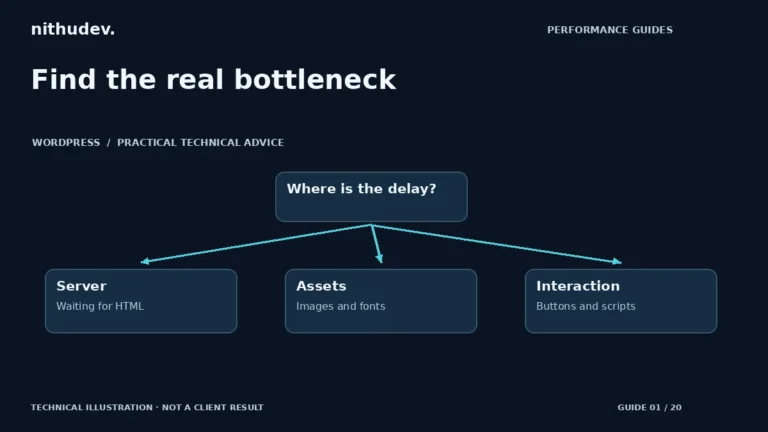
Start with the slow task and its evidence. A slow first response, a late hero image and a frozen menu need different fixes.
Read the guideThe NithuDev journal
Practical guides to website performance, security, SEO, ecommerce, automation and redesign. Understand what needs fixing, compare your options and plan your next website project.
Written by Nithu / Suthakaran Nithursan · Website developer & security recovery specialist
Follow your interest
Useful guidance, grouped around the work your website needs.
Caching, Core Web Vitals, images, Elementor and WooCommerce performance.
Explore this topic 40 guidesMalware recovery, safer updates, backups and practical hardening.
Explore this topic 40 guidesWebsites, booking, CRM, automation and clear project decisions.
Explore this topic 20 guidesForms, CRM, reminders and integrations with clear staff handoffs.
Explore this topic 20 guidesTechnical SEO, useful content, campaigns and enquiry measurement.
Explore this topic 20 guidesProducts, checkout, payments, orders and customer documents.
Explore this topic 20 guidesProject scope, content, accessible layouts and clearer customer journeys.
Explore this topic 20 guidesHosting, renewals, controlled updates and practical support arrangements.
Explore this topic Performance guidesMobile loading, LCP and app audits for a smoother shopping experience.
Explore this topicA useful place to begin
Three guides for three common website decisions.
Start with the slow task and its evidence. A slow first response, a late hero image and a frozen menu need different fixes.
Read the guideA customer says your website sent them to a strange page. Your host sends a suspension notice. Or you log in and find an administrator you did…
Read the guideA doctor website quote makes sense only when you understand what it buys. A five-page practice website connected to an existing booking tool is a different project…
Read the guideThe guide library
242 published guides
Review website facts, contact journeys, dependencies and useful evidence on a regular schedule. Turn findings into a small prioritised worklist.
Read the guideRemove unnecessary access when responsibilities change while preserving business-controlled integrations and recovery routes.
Read the guideRemove obsolete website tools with a data, dependency and rollback plan. Confirm that the old service is no longer needed before cancelling it.
Read the guideRecord meaningful website changes, reasons and verification results. Keep routine maintenance summaries clear without exposing credentials.
Read the guideSend the affected URL, steps and safe evidence when requesting website support. Keep passwords and private customer information out of public messages.
Read the guideInvestigate uploads, backups, logs and generated assets when hosting storage fills. Avoid deleting unknown folders or current recovery copies.
Read the guideReview scheduled tasks, timing assumptions and failure visibility. Keep cron configuration tied to the actual host and workflow requirements.
Read the guideInventory DNS records before moving hosting or nameservers. Keep email, verification and external services in the migration plan.
Read the guideReview current WordPress and extension requirements before a PHP change. Test important functionality and retain a supported rollback arrangement.
Read the guideRecord why each plugin exists, who maintains it and what depends on it. Review licences without deleting unfamiliar components blindly.
Read the guideKeep a concise record of symptoms, decisions and recovery checks during website incidents. Avoid filling logs and support messages with private data.
Read the guideChoose monitoring checks that reflect important public functions and a practical response plan. A successful homepage request does not prove every integration works.
Read the guideFor your online store
Diagnose slow Shopify mobile pages with a practical LCP workflow, comparable tests, image-loading checks and shopping-flow validation.
Read the guideAudit Shopify app scripts, identify unnecessary loading, test dependencies and clean up carefully while preserving essential store features.
Read the guideFrom understanding to implementation
I’m Nithu / Suthakaran Nithursan. I build, repair and improve websites, with services covering performance, security recovery, Shopify and clinic websites. These guides help you ask better questions; a project review helps define the work your website actually needs.
Meet the developer